Control your radio from any web browser with real-time audio streaming and Morse decoding.
💡 Key Features
📻
Frequency Control
Click and scroll to tune any digit
🎧
Audio Streaming
Real-time playback via Web Audio
🔢
Morse Decoder
Server-decoded CW in real-time
💾
Memory Channels
14 buttons with long-press save
📱
Responsive Design
Works on desktop and mobile
🔒
Auto-Reconnect
Automatic reconnection on loss
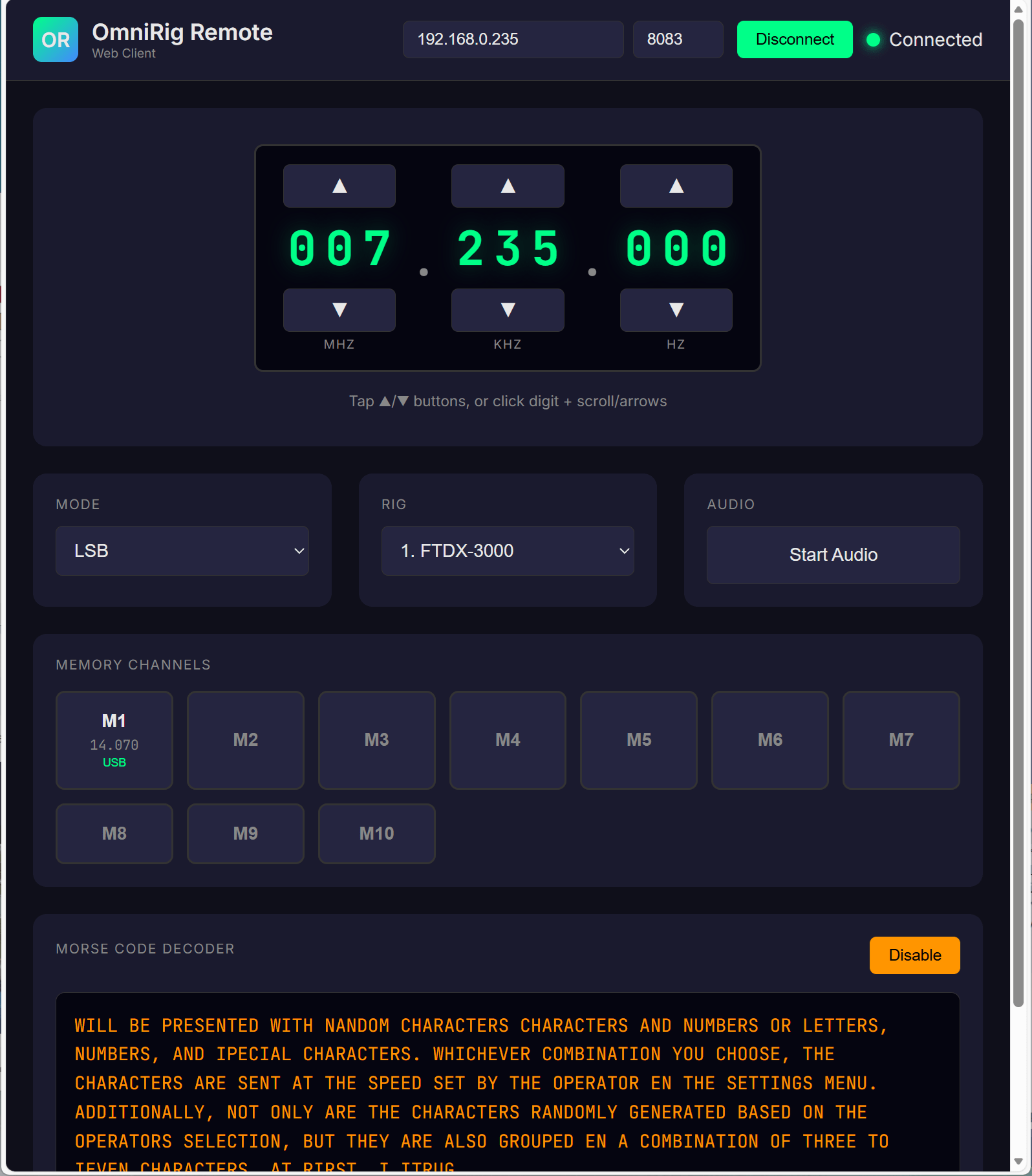
Web client interface showing frequency display, mode selector, and memory buttons
🚀 Accessing the Web Client
Built-in Server (Recommended)
The server includes a built-in HTTP file server on port 8084. Simply open your browser to:
http://[SERVER_IP]:8084
Example: http://192.168.1.100:8084
🔒 HTTPS Recommended
For best audio performance, serve the web client over HTTPS. This enables AudioWorklet for lower latency audio.
🎮 Frequency Tuning
Mouse/Desktop
- Click any digit to select it (highlighted)
- Scroll mouse wheel over any digit to change it
- Arrow Up/Down keys change the selected digit
- Arrow Left/Right keys move selection between digits
Touch/Mobile
- Tap any digit to select it
- Tap arrows to increase/decrease selected digit
- Long-press arrow buttons for continuous tuning
🎧 Audio Streaming
Starting Audio
- Click the Start Audio button
- Browser may prompt for audio permission – click Allow
- Audio begins streaming from the server
⚠ Browser Autoplay Policy
Browsers require user interaction before playing audio. Click something on the page first.
🌐 Browser Compatibility
| Browser | Version | Status |
|---|---|---|
| Chrome | 66+ | ✓ Full support |
| Firefox | 76+ | ✓ Full support |
| Safari | 14.1+ | ✓ Full support |
| Edge | 79+ | ✓ Full support |
| Chrome Android | 66+ | ✓ Full support |
| Safari iOS | 14.5+ | ✓ Full support |
🔧 Troubleshooting
Cannot Connect
- Verify server IP address and port (8083)
- Ensure OmniRig Remote Server is running
- Check firewall allows port 8083
No Audio
- Click somewhere on the page first (browser autoplay policy)
- Check browser allows audio for this site
- Ensure audio streaming is enabled on the server
Audio Glitches
- Use wired network instead of WiFi
- Close other browser tabs using audio
- Serve over HTTPS for AudioWorklet support