ShackLink · Android Auto
Your station’s receiver on the car’s screen. The waterfall edge to edge, the VFO, band and mode, every decoder ShackLink runs, and the station’s own audio through the car’s speakers, over your home Wi-Fi or mobile data, for the passenger to tune.
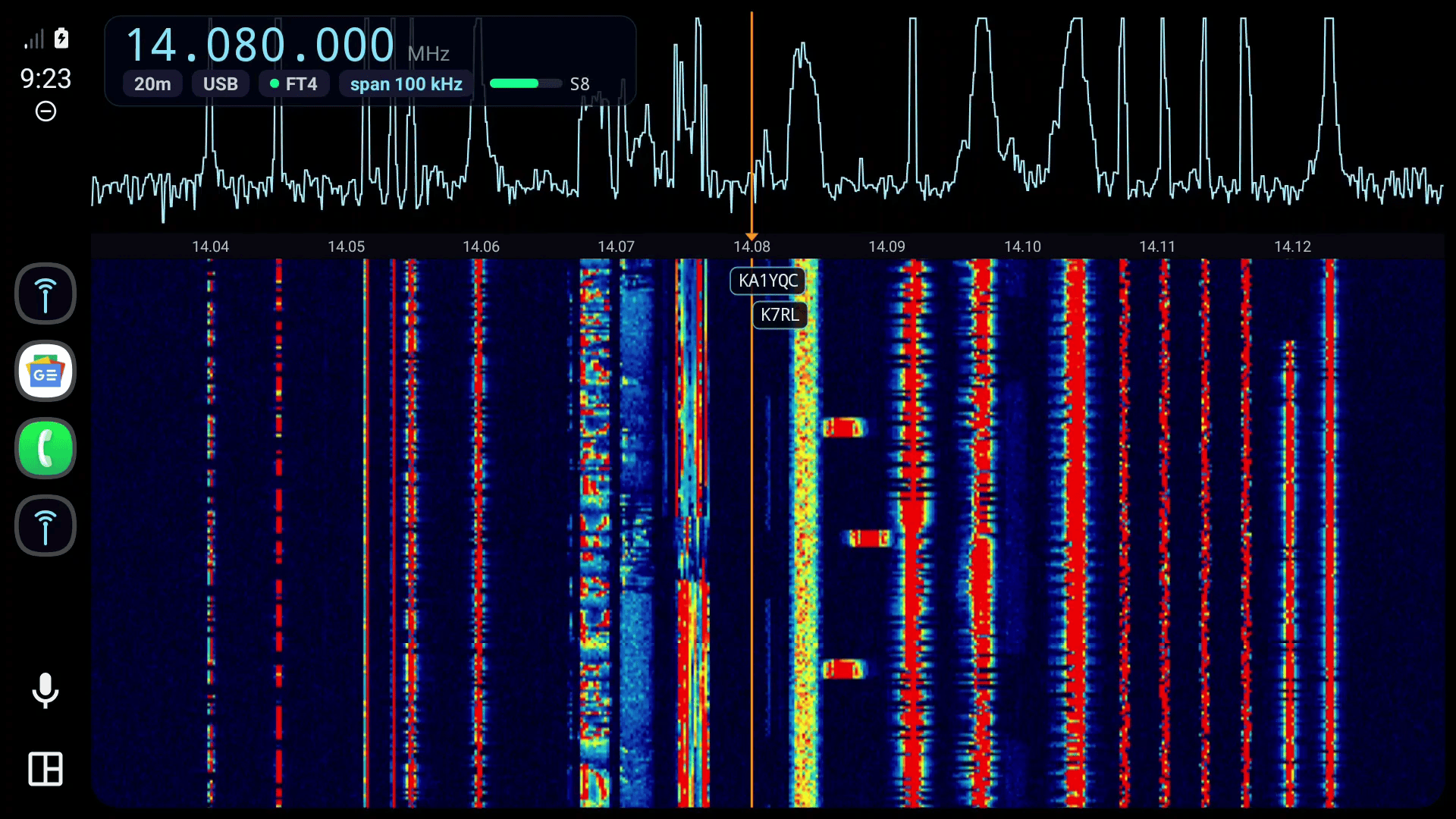
The Waterfall view: the station’s spectrum and waterfall from edge to edge under Android Auto’s buttons, zoomed to 100 kHz, with the VFO in a heads-up display and the FT4 stations tagged where they were heard.
Three views, one strip of buttons
Radio
The VFO and S-meter, the spectrum and waterfall with tap-to-tune and its own + and −, the decoder beside them, and six large tiles: step, memory, band, mode, decoder, step.
Waterfall
The whole screen is waterfall. FT8 and FT4 callsigns sit where they were heard; CW, RTTY, PSK31, Olivia, NAVTEX and APRS run along a ticker; an SSTV or WEFAX picture fills in, in a corner.
Decode
The decoder, full screen and in large type: FT8 tables in columns, decoded text, APRS stations, and SSTV and WEFAX pictures as they arrive.
Android Auto draws the same four buttons in every view (Waterfall, Decode, Mute and Settings), and the view you are in is the highlighted one. Pressing it again returns to Radio.
What it does
The station’s own receiver
The car shows and plays whatever the station’s console receiver does, and follows it when the shack switches to another SDR.
A zoom that is yours alone
+ and − crop this car’s view at the station, from the whole span down to 2 kHz. Nobody else’s waterfall changes, and the dial keeps its place on screen as you zoom.
Tap to tune
Touch a signal to tune to it; in CW the dial snaps to the nearest one. Step tiles, the server’s 19 bands from LW to 70 cm, and nine modes.
Every decoder
FT8, FT4, CW, RTTY, PSK31, Olivia and Contestia, NAVTEX, APRS, WSPR, JS8, SSTV and WEFAX. Picking one switches the station’s decoder, as every ShackLink client does.
Callsigns on the waterfall
The newest FT8 or FT4 cycle’s senders are tagged on the waterfall where each was heard, with CQs in green.
Your memories
Recall any memory stored at the station. A label that names a mode switches the decoder too, so SSTV 10m lands ready to decode.
The station’s audio
Opus at about 3 KB/s through the car’s speakers. It starts when you open ShackLink Car, keeps playing behind the map, and ducks under navigation prompts.
Home Wi-Fi or mobile data
At home the phone finds the server by itself. On the road it goes through your tunnel with the station’s shared secret, which never crosses the wire.
Honest when the signal drops
A LOST clock, the last picture kept and dimmed, nothing left pressable that would be ignored, and a reconnect the moment the phone finds a network again.
Day and night
Follows Android Auto: a light theme by day, the dark one at night and in tunnels, with the waterfall’s history kept across the switch.
Counts its data
Data use per minute while you drive, and the whole drive’s total waiting on the phone afterwards.
Receive only
There is no transmit in the car at all: no key, no PTT, no microphone.
A tour
Every picture is ShackLink Car on Android Auto’s Desktop Head Unit at 1920 × 1080, tuned to a synthetic test band at the station. Click one to see it full size.

Radio: the VFO and meter, the band from edge to edge at 100 kHz with + and − beside it, the FT4 decodes on the right, and the step, memory, band, mode and decoder tiles.

FT8 at 5 kHz: each sender of the newest cycle tagged where it was heard, CQs in green, in three lanes that never overlap.
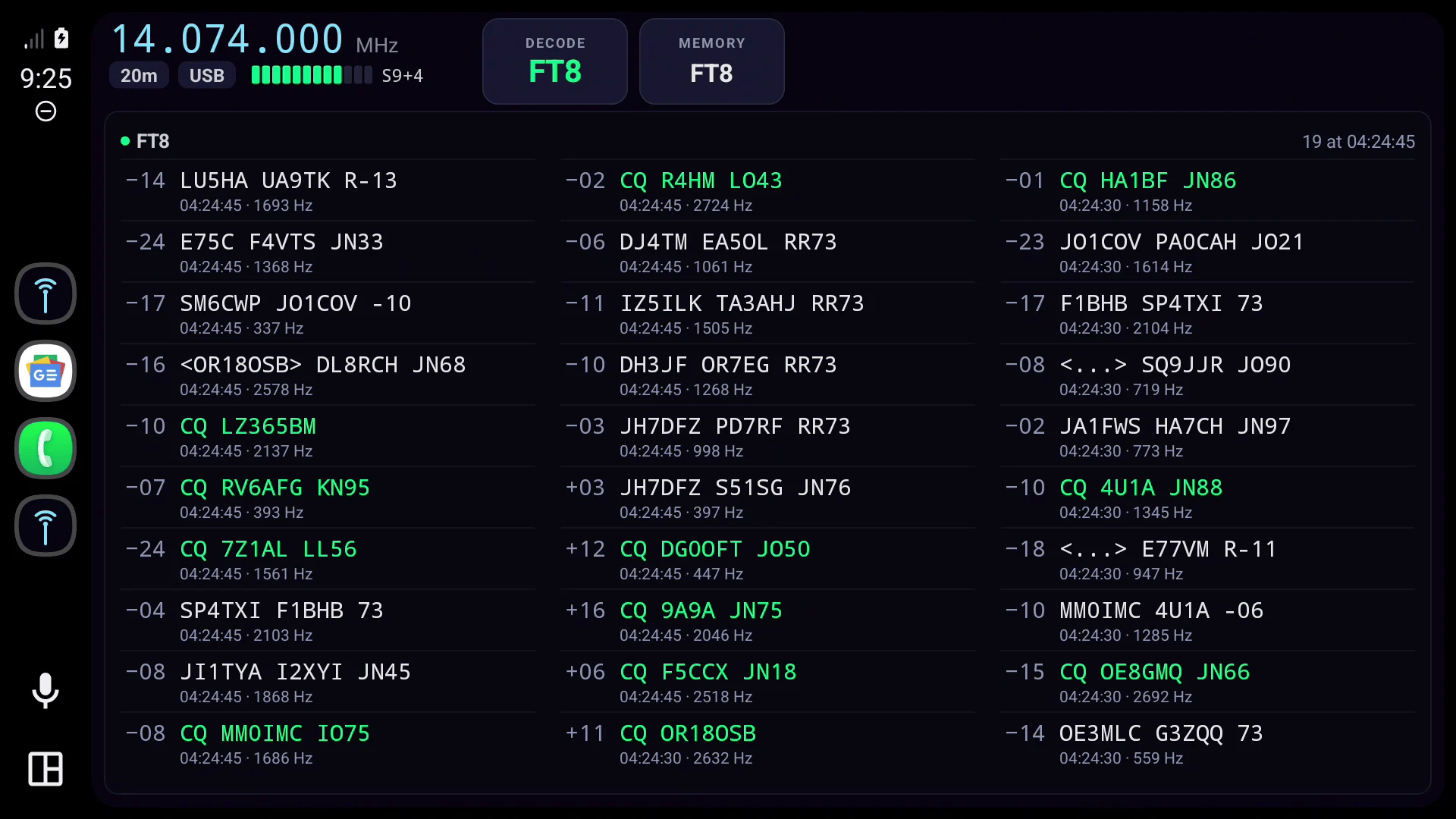
Decode: FT8 in three columns on a wide screen, newest first.
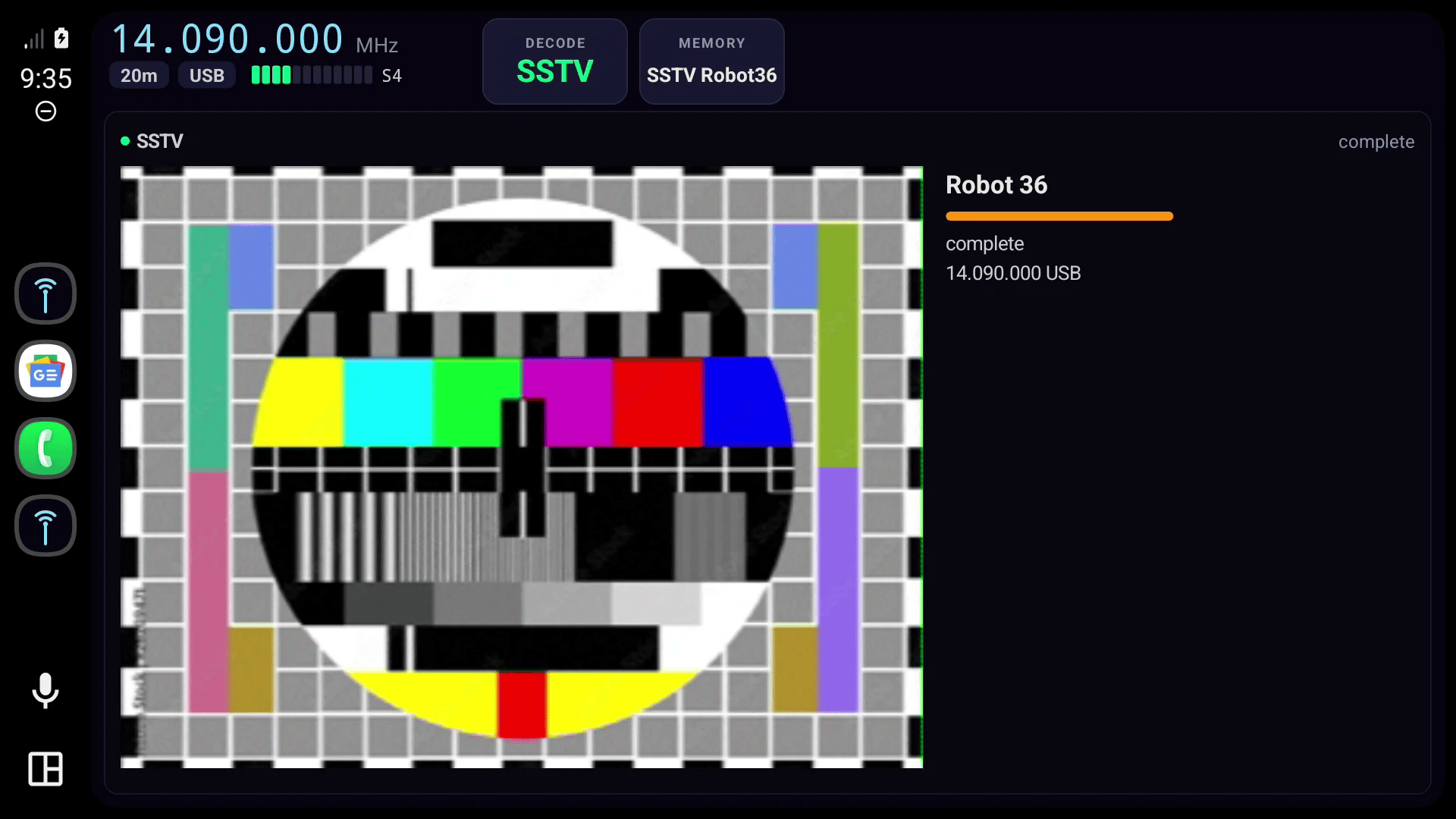
SSTV: a Robot 36 picture, complete; it fills in line by line as it arrives.

Bands: the server’s nineteen, in tiles sized for a finger.
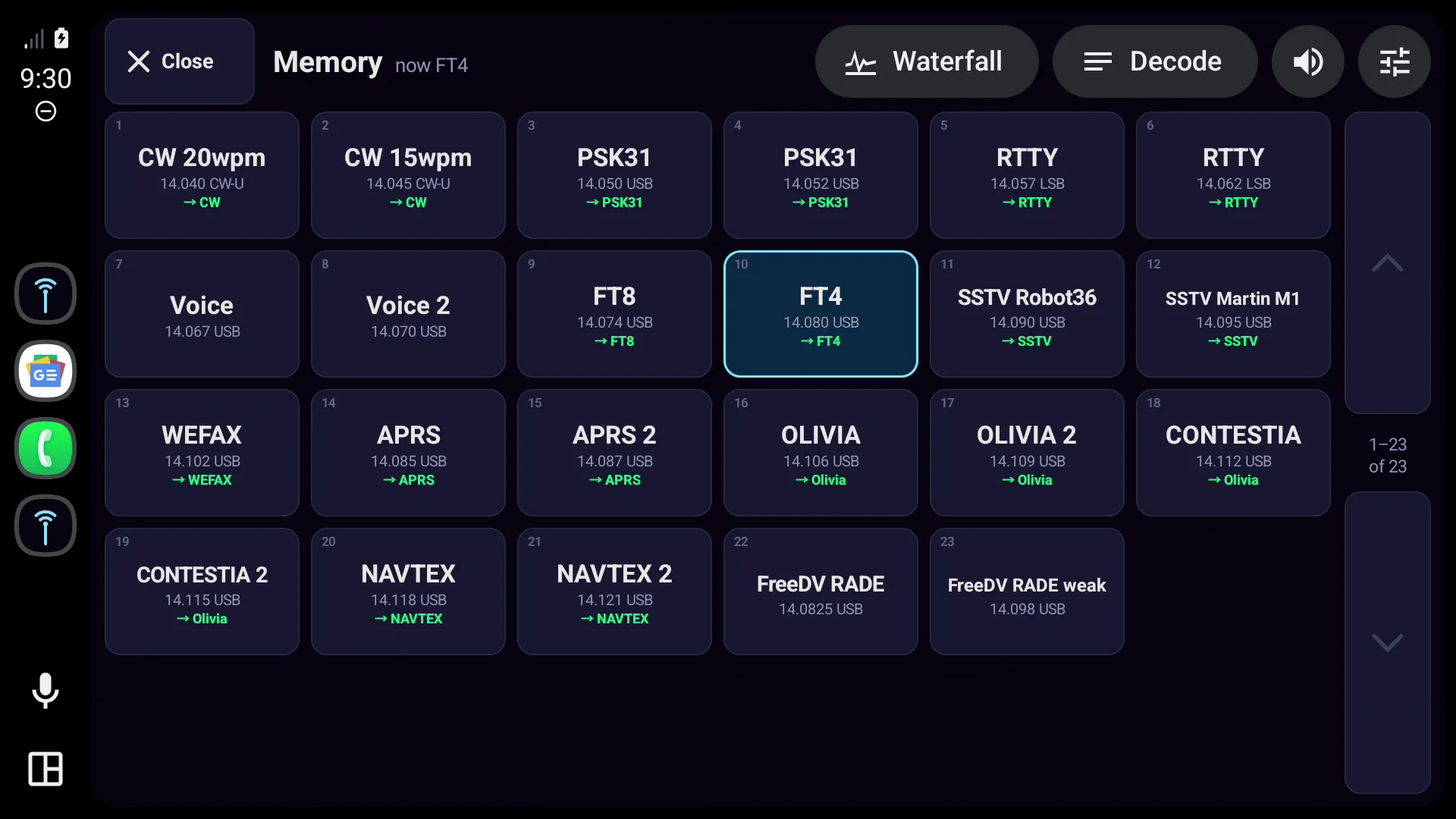
Memories: the station’s bank, with the decoder each label switches to.

By day: a light theme and a light waterfall, switched by Android Auto itself.

Lost the station: the clock runs, the last picture stays under a veil, and Try again is one tap away.
How it connects
ShackLink Car is a client of ShackLink Server, like the desktop, web and mobile clients. It speaks the server’s WebSocket on port 8084, and needs nothing new from the server.
Set it up on the phone
Open ShackLink Car on the phone once. On the station’s Wi-Fi it finds the server by itself; otherwise type its address. Typing is blocked while driving, so this part is done on the phone.
For the road: your tunnel and the secret
Off the home network the phone reaches the station through the same tunnel the other clients use (Cloudflare Tunnel, Tailscale, nginx or a port-forward). Enter its address, for example https://shack.example.org, and the shared secret from the server’s Station Settings › Security.
Open it in the car
Pick ShackLink Car in Android Auto’s launcher. The station’s audio starts the first time you open it, not when the phone merely connects to the car.
Turn on authentication before exposing the station
Enable Station Settings › Security › Enable authentication on the server. A server built on or after 30 October 2026 always asks a client that arrives through a tunnel or proxy for the secret, even with Require auth on LAN off.
What it costs on mobile data
| Stream | Per second | Per hour |
|---|---|---|
| Spectrum, 512 bins at 10 frames a second | ≈ 10.5 KB | ≈ 39 MB |
| Whole-span overview (for the zoom) | ≈ 2.2 KB | ≈ 8 MB |
| Audio, Opus | ≈ 3 KB | ≈ 11 MB |
| Station state and meters | ≈ 1 KB | ≈ 3 MB |
| Total | ≈ 17 KB | ≈ 61 MB |
Measured on the station’s LAN; the phone’s own count runs higher by the packet overhead. Zooming in costs less: at 2 kHz the spectrum is under 2 KB/s. The phone screen keeps the last drive’s total.
What you need
- ShackLink Server, with an SDR slot as the console’s receiver for the spectrum and waterfall. With only the rig’s own audio, the car shows the VFO, the decoders and the audio.
- An Android phone with Android 10 or newer and Android Auto.
- A car or head unit with Android Auto and a touchscreen. On a rotary knob or touchpad the knob reaches Android Auto’s own buttons (views, mute, tune and zoom in the Waterfall view); the tiles and pickers are for touch.
- The station reachable from the road: a tunnel or port-forward to port 8084, with authentication on.
Why it is not on Google Play
Android Auto gives a drawing surface only to navigation apps, and a waterfall needs one. Google Play lists a navigation app only when it navigates, so ShackLink Car cannot be listed there. It is in testing.
Built for the passenger
ShackLink Car shows decoded text and pictures while the car is moving. Android Auto cannot tell whose finger is on the screen; keep the tuning to the passenger and your eyes on the road.
The rest of ShackLink
Click anywhere or press Esc to close