
Desktop widgets for Windows
DitDots Widgets
The things you glance at all day, in one small always-on-top panel: the time where it matters, a timer, the weather, the markets, how hard your PC is working, internet radio, your own music, a live spectrum analyser and a recorder. Arrange it in up to six columns and give every monitor its own layout, or open seven of them on their own, each in its own window. Either way, nothing about you leaves your PC.
Free. No account, no sign-in, no telemetry. Windows 10 and 11.
▶️ See it in two minutes
The panel at work, then everything you can change about it.
 2:12
A walkthrough of DitDots Widgets
The whole panel live with music playing, the clock’s faces and an alarm, the timers, the weather, the markets and your PC’s vital signs, a radio station, your music and the analyser’s looks, the recorder, then columns, switching a widget off, dragging, folding, eleven themes, the widgets on their own and a wide bar display.
Watch it on YouTube →One panel instead of ten windows
This started as one small widget on my own monitor, and then there was a second one, and a third, each with its own window, its own tray icon and its own idea of where it should sit. Three widgets meant three title bars, three sets of padding and three tray icons all offering the same Show and Exit. So they became sections of one panel: one window to place, one tray icon, one hotkey.
It lives on a very wide monitor and, some days, on a small bar display underneath it. That is why every monitor gets its own arrangement (two columns on one, five on the other) and why the panel remembers which is which when you drag it across.
The rules it is built to are simple. A widget you switch off stops entirely, rather than hiding while it keeps polling. Numbers that could be stale say how old they are. And the only things that go over the internet are the ones you asked for: the forecast for your place, the prices for your symbols, the stations you add.
🧩 One panel
Always on top, out of the way. Every widget is a section you can show, switch off, collapse to one line or drag to another column.
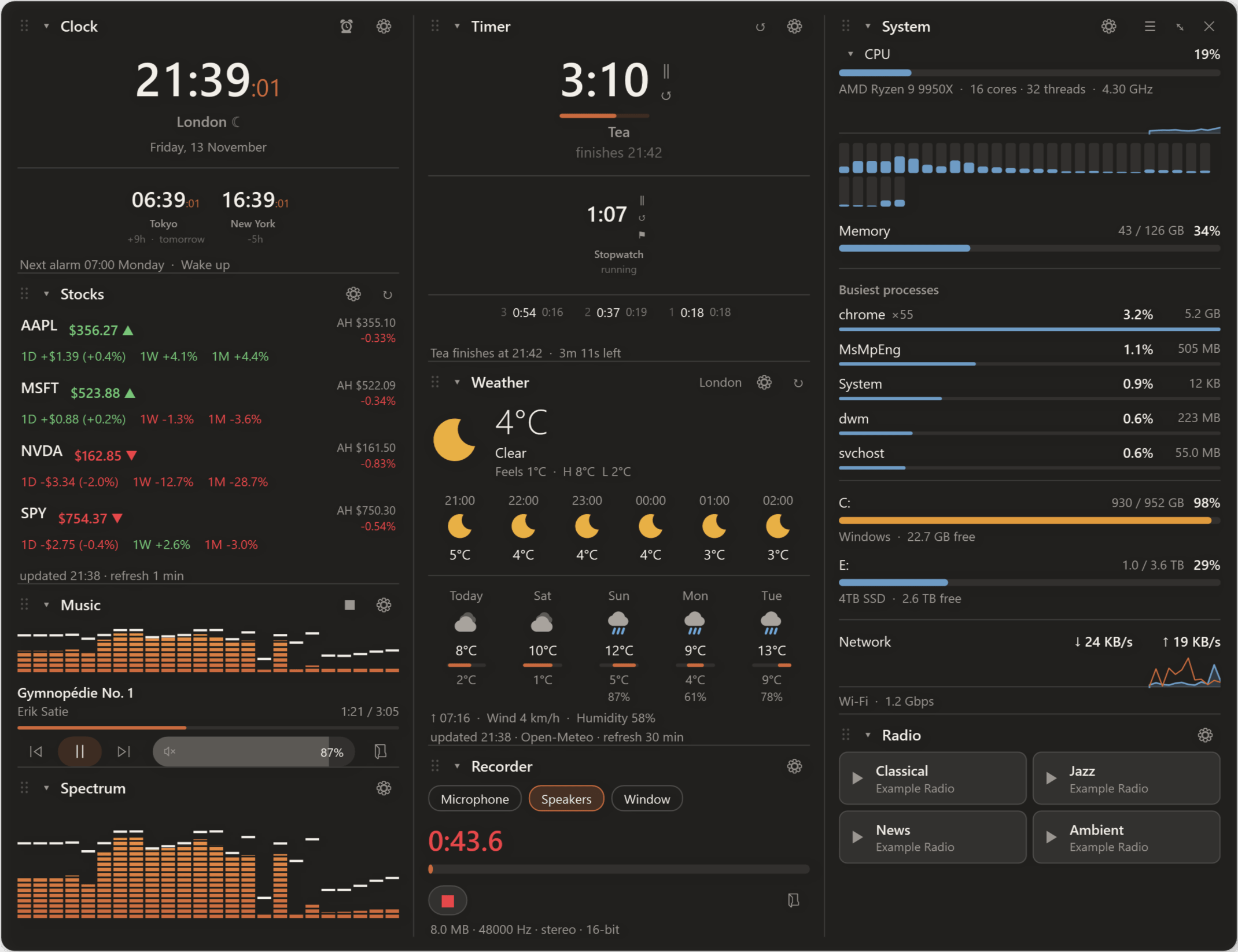
The panel, as it opens the first time: three columns, evened up so no column runs longer than it has to. Clocks for London, Tokyo and New York, a tea timer, the watchlist, London’s weather, the PC’s vital signs, and the audio widgets underneath.

Eleven themes, eight dark and three light. The panel, its settings windows and the tray icon change together.

A layout per monitor: five columns on a 1920×720 bar display, two on the main screen. Drag the panel across and it switches.
🪟 In the panel, or on their own
The Clock, Weather, Stocks, System, Radio, Music and Spectrum also have their own Start-menu entries, and open as windows of their own, each with its own tray icon, size and hotkey.

On their own: DitDots Clock, DitDots Weather and DitDots Spectrum, each started from the Start menu. A widget’s settings are the same whichever way it runs, so the clocks, the place and the look you chose in the panel come with it.
🧩 One panel
Everything you keep in one window: one place on the screen, one tray icon, one hotkey, and columns that remember each monitor.
🪟 Or a few windows
The clock in a corner, the analyser along the bottom of the screen, the weather on the second monitor. Each one moves, resizes and scales on its own.
🔢 The shape of it
What it is, in a few numbers.
⚙️ What is in it
Ten widgets. Keep the ones you want; the rest stop completely when you switch them off.
🕐 Clock
Any number of time zones, in eight faces: digital, thin, seven-segment, split-flap, analog, minimal, Braun-style and Roman. Each shows how far it is from here, and when it is already tomorrow.
Alarms on the days you choose, in any time zone, with the sounds Windows ships, snooze, and an honest note when one was missed because the PC was asleep.
⏱️ Timer
Countdowns and a stopwatch side by side, in the clock’s faces, with laps. A finished countdown dims the screen or shows a card, and a running timer keeps its place through a restart.
⛅ Weather
Now, the next hours and the days ahead, for any place in the world, in its own local time. For US places the National Weather Service’s forecast is laid over the top. Rain on the way raises a notice.
📈 Stocks
A watchlist with the price and the day, week and month changes, a month’s mini chart, and pre-market and after-hours moves. London prices in pence, as they are quoted. It refreshes quickly while markets are open and slows down when they close.
💻 System
Processor (per core too), memory, graphics, drives, network and battery, and the busiest programs. Thresholds you set colour the row, and the tray icon, when something is working too hard.
📻 Radio
Internet radio stations as buttons: one plays, pressing another takes over. Paste any
station’s stream address (MP3, AAC or a .pls/.m3u
playlist) and it becomes a button. It comes with none; the stations are yours.
🎵 Music
A playlist of your own MP3, OGG, FLAC and WAV files, with the titles from their tags, the PC’s volume, and a spectrum strip under the transport.
🎙️ Spectrum
A full spectrum analyser listening to your speakers or a microphone: solid and LED bars, peak tiles, two scopes, a waterfall, a waveform and a VU meter, six palettes, and a stereo split with left above and right below.
⏺️ Recorder
Record a microphone, whatever the PC is playing, or a single window as an MP4. The file is valid from its first second, so even a power cut leaves something that plays. Recordings go to your Music and Videos folders, and nowhere else.
📡 ShackLink
For owners of a ShackLink amateur-radio server: the VFO, a memory keypad and a live waterfall in the panel. Receive and control only. Off until you switch it on.
📐 Arranged your way
Everything a panel on a busy desktop needs, and nothing it would have to keep asking about.

☰ DitDots settings: how many columns, which widget goes in which, and Even them up, which splits the sections so the tallest column is as short as it can be.

Eight faces, shared by the Clock and the Timer: here analog, split-flap, seven-segment and Braun-style. And any section folds to one line with its headline when you are not reading it. Alarms and timers keep running while it is folded.
✋ Drag by the title
Pick a section up by its grip and drop it anywhere, including into another column. The panel shows where it will land before you let go.
🖥️ A layout per monitor
Each monitor remembers its own column count and order, and its own size. Arriving on a new one changes nothing until you change it there.
🔍 Ctrl + wheel
Over the panel, Ctrl and the mouse wheel make everything bigger or smaller, remembered per monitor. It starts at the size Windows’ own display scaling asks for.
⌨️ Hotkey and login
An optional global hotkey shows and hides the panel, and it can start with Windows. Both are off until you turn them on.
🎧 Sound you can see
The analyser listens to whatever your speakers are playing, from any program, or to a microphone.

Spectrum: LED bars, the classic scope in the Neon palette, and the stereo split. Hidden or collapsed, it stops listening and costs nothing.

Recorder: three modes and one button. A recording is never interrupted by the other widgets, and a take with nothing in it is not kept.
💻 Your PC, honestly measured
Two numbers in the System widget deliberately disagree with Task Manager, and say why on the row.

System: the processor with its per-core strip, memory, the graphics card, the busiest programs, drives and the network, read with one system call each rather than a handle per process.
Processor time, not processor utility. Task Manager scales its figure by how fast the clock was running, so a core dawdling at 800 MHz counts as partly busy. This is the literal measure: the share of time the processor was not idle. The live clock speed beside it is what makes the gap visible rather than mysterious.
Private memory. A program’s memory is the part only it holds, the same as Task Manager’s Memory column, so a browser’s forty processes are not each charged for the same shared libraries.
A hidden panel samples two numbers. While the panel is hidden it reads only the processor and memory, the two the tray icon shows, every ten seconds.
✅ What is checked
What has been exercised by test harnesses and on real hardware.
| Claim | How it is checked | Status |
|---|---|---|
| A recording is a valid file even after a crash | A recording process is killed mid-take; the file it leaves opens, with its header describing what is on disk. Three takes in a row, a full queue, a full disk and 3- to 8-channel audio are checked byte for byte | Tested |
| Alarms ring once, on time, in the right zone | An alarm moved to a time already past, one switched back on days after it rang, and one in a zone whose day differs from yours: none rings early or reports a false miss | Tested |
| Forecast times are the place’s own | Hours, sunrise and sunset checked across the autumn and spring daylight-saving changes | Tested |
| Quotes are read correctly | London prices in pence, Johannesburg and Tel Aviv converted, a rate-limited or refused feed named as such rather than retried forever | Tested |
| The Microsoft Store package | Built with only the ten Store widgets, their licence notices and the user guide inside, checked file by file | Tested |
🔒 Yours, on your PC
A desktop panel sees a lot. It keeps all of it.
Four destinations
Open-Meteo and, for US places, the National Weather Service for the forecast; Yahoo Finance for your symbols; the radio stations you add. Straight to them, with nothing identifying you.
No account
Nothing to sign in to, no licence server, no analytics, no advertising. Clock, Timer, System, Music, Spectrum and Recorder work with the network unplugged.
Sound stays here
The analyser measures sound and throws it away. The recorder records only when you press record, saves to your own folders, and never uploads anything.
The full policy is on the DitDots Widgets privacy page.
🖥️ What you need
Windows
- ✓ Windows 10 version 2004 or later, or Windows 11
- ✓ An Intel or AMD PC (x64)
- ✓ Nothing else to install
For the audio widgets
- ✓ Speakers or headphones
- ✓ A microphone, to record one
- ✓ On Windows N: the free Media Feature Pack
Online
- ✓ An internet connection for weather, quotes and radio
- ✓ Everything else works offline
- ✓ ShackLink: your own ShackLink server
▶️ Started in a minute
Open it
The panel appears near the top-right of your main screen in two or three columns. Drag it anywhere by any blank part; resize it from any edge.
Keep what you want
☰ on the panel lists every widget. Untick the ones you do not need (they stop completely) and choose how many columns.
Tell it where you are
⚙ on the Weather section finds your place; ⚙ on the Clock adds the time zones and alarms you care about; ⚙ on Stocks takes your symbols.
Add your sound
Paste a station’s stream address into Radio, add a folder of music to the playlist, and pick the analyser’s look.
Make it stay
Right-click the tray icon for Run at login, and turn on a hotkey in ☰ if you want one. F1 opens the illustrated user guide.
🧱 Built on
DitDots Widgets is a .NET 10 WPF application. Forecasts come from
Open-Meteo (CC BY 4.0)
and the US National Weather Service,
quotes from Yahoo Finance. Window recording uses ScreenRecorderLib and the
ShackLink dial is drawn with SkiaSharp; their licence notices ship with the app,
in THIRD-PARTY-NOTICES.txt beside it. The user guide is inside too: press F1.
🧩 DitDots Widgets
One panel for everything you glance at, laid out the way your desk is, and quiet about it: no account, nothing sent about you, and every widget you switch off actually off.
Free. Windows 10 or 11, x64.
Click anywhere or press Esc to close